 592781212
 Login
Login Register




_1722152033.png)
Digital Printing Workflow - Complete Guide
Digital Printing Workflow — Complete Guide from A to Z
What Is Digital Printing?
Digital printing is a modern printing technology that transfers images, graphics, or text directly from a computer to a printing device without the need for traditional printing plates. This method is known for its speed, high print quality, and cost-effectiveness, especially for short-run production.
Digital printing is widely used in advertising, publishing, packaging, and business applications where fast turnaround times and excellent print quality are required.
How Does the Digital Printing Process Work?
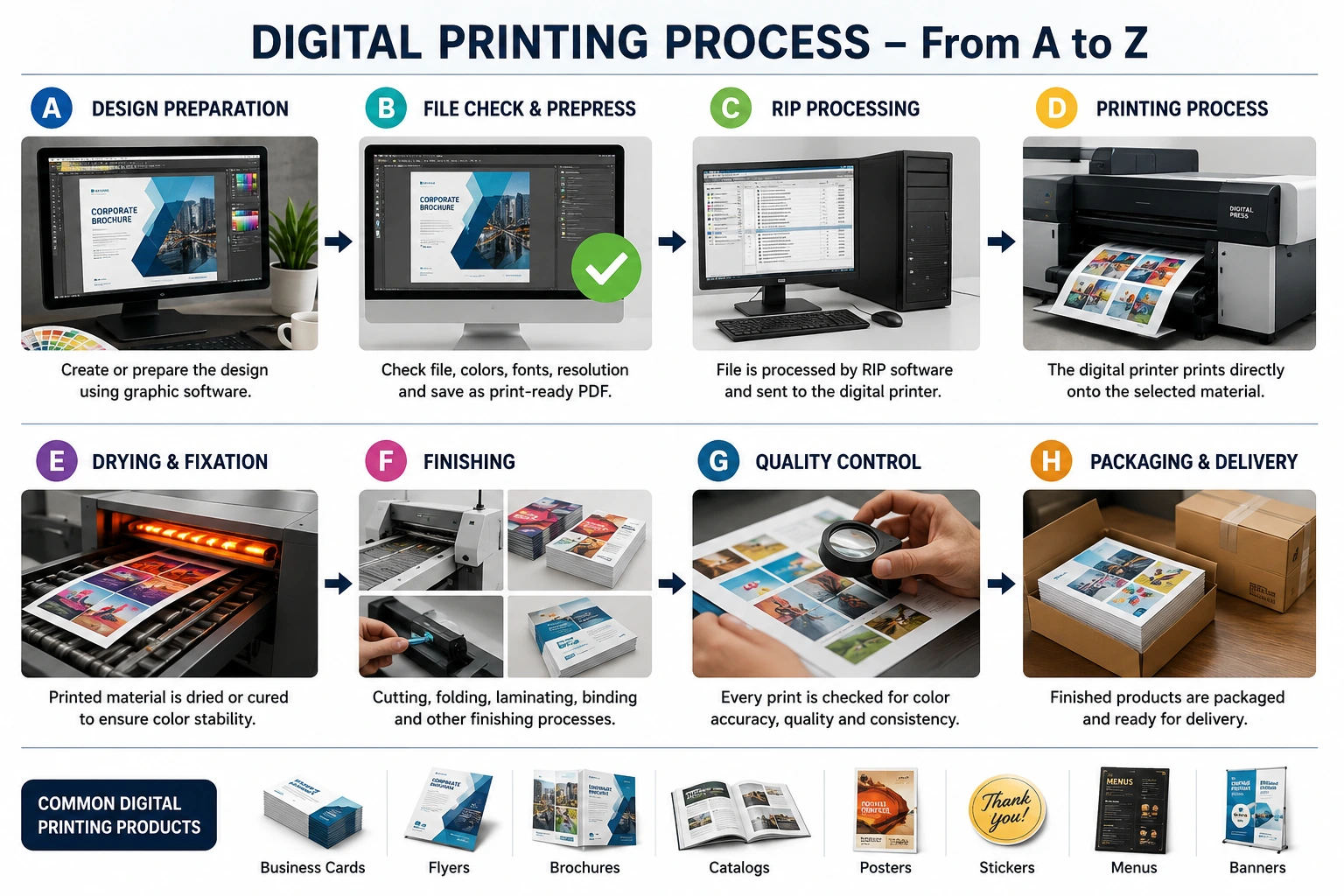
A. Design Preparation
The first step is creating or preparing the design using graphic design software such as Adobe Illustrator, Adobe Photoshop, CorelDRAW, or similar applications.
During this stage, special attention is paid to:
-
CMYK color mode
-
Image resolution
-
Document dimensions
-
Bleed and safety margins
-
Print-ready layout preparation
B. File Inspection and Prepress Check
Before printing, the artwork undergoes a technical review to ensure it meets production requirements.
This includes:
-
Font verification or conversion to outlines
-
Color profile inspection
-
Resolution checking
-
Size and layout verification
-
Exporting the final file in a print-ready format, typically PDF
C. RIP Processing and Printer Setup
The approved file is sent to the printer through a RIP (Raster Image Processor) system.
The RIP software converts digital artwork into a format that the printer can interpret, optimizing color management, image quality, and printing parameters.
D. Printing Process
The digital printer applies toner or ink directly onto the selected substrate.
Common digital printing technologies include:
-
Laser printing
-
Toner-based digital printing
-
HP Indigo digital printing
-
UV digital printing
-
Inkjet digital printing
This process delivers sharp details, vibrant colors, and consistent print quality.
E. Drying and Fixation
After printing, the printed material undergoes a drying or curing process.
Depending on the technology used, this may involve:
-
Heat fixation
-
UV curing
-
Automatic drying systems integrated into the printer
This stage ensures durability and color stability.
F. Finishing Operations
Once printed, the products may receive additional finishing treatments such as:
-
Cutting and trimming
-
Folding
-
Laminating
-
Binding
-
Perforating
-
Creasing
-
Numbering
-
Die-cutting
These processes enhance both functionality and appearance.
G. Quality Control
Quality inspection is performed to verify that the finished product meets production standards.
The inspection typically includes:
-
Color accuracy verification
-
Print sharpness evaluation
-
Text readability checks
-
Registration accuracy
-
Dimensional consistency
This step helps ensure customer satisfaction and product reliability.
H. Packaging and Delivery
The final printed products are carefully packaged and prepared for delivery.
Common digital printing products include:
-
Business cards
-
Flyers
-
Brochures
-
Catalogs
-
Posters
-
Stickers
-
Menus
-
Presentation folders
-
Marketing materials
-
Personalized promotional items
Advantages of Digital Printing
✔ Fast production turnaround
✔ Cost-effective for short runs
✔ High-quality print output
✔ Easy customization and personalization
✔ Consistent color reproduction
✔ Minimal setup requirements
✔ Suitable for on-demand printing
Conclusion
Digital printing has become one of the most widely used technologies in the printing industry. Its combination of speed, flexibility, efficiency, and outstanding print quality makes it an ideal solution for businesses, organizations, and individuals seeking professional printing results. Whether producing marketing materials, promotional products, or customized print runs, digital printing provides a reliable and modern approach to print production.

